Balance Transfers
Transfer Your Balance
Members can perform a balance transfer through online banking using a computer or through the Credit Union of Georgia mobile app.

Online Banking Balance Transfer Steps

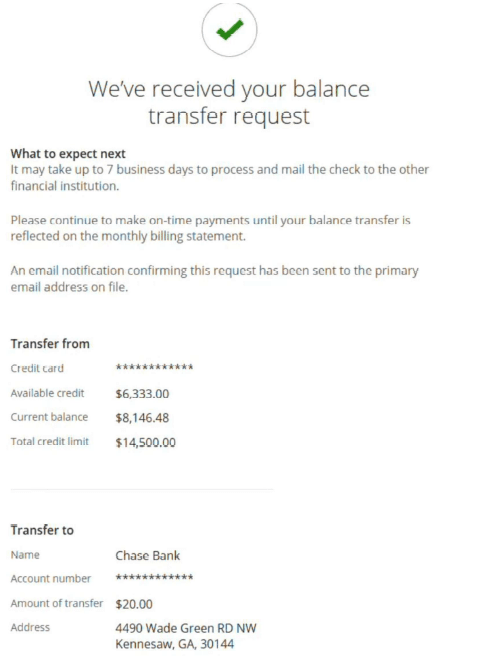
1. Log in to your Credit Union of Georgia account through online banking.
2. Search for Loans and Credit Cards on the top ribbon. Select Credit Card Services.
3. Select Credit Card Services.
4. Select the three bars in the top left-hand corner to open more options.
5. Select Manage Card.
6. Select Balance transfer.
7. Fill out the information for the card you want to move the balance from. You will need the account number, transfer amount, as well as the name and address of the financial institution holding the balance.
8. Enter your valid email address. This is where you will receive email confirmation of the balance transfer.
9. View the Terms & Conditions. Click the box to verify that you have read and acknowledged the Terms & Conditions.
10. Press Submit. Then, navigate to your email inbox to check for a confirmation email. This email will give you an overview of the transfer details and next steps.
Mobile Banking Balance Transfer Steps
1. Log in to your Credit Union of Georgia account through our app.
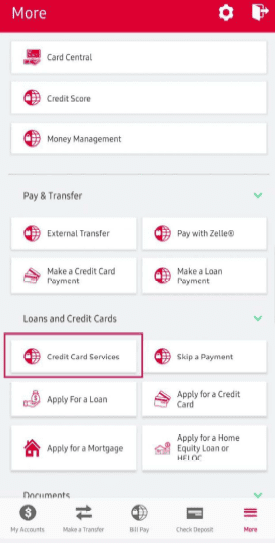
2. Click on More on the bottom ribbon. Open the Loans and Credit Cards drop-down menu.
3. Select Credit Card Services.
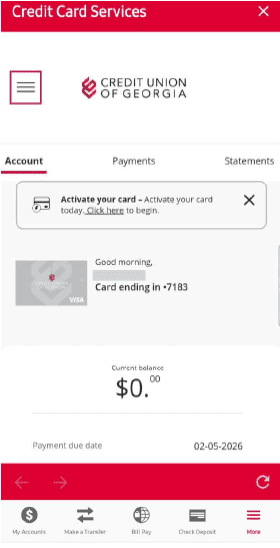
4. Select the three bars in the top left-hand corner to open more options.
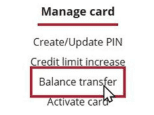
5. Select Manage Card.
6. Select Balance Transfer.
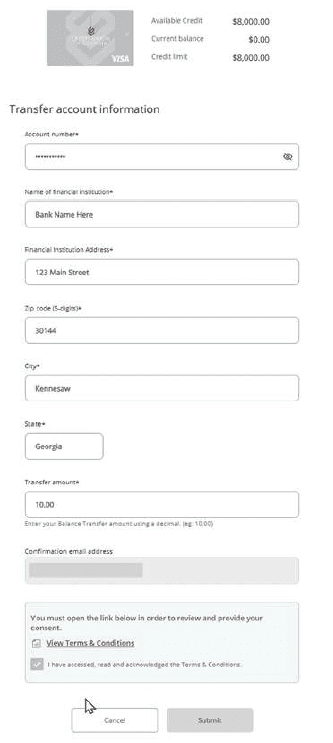
7. Fill out the information for the card you want to move the balance from. You will need the account number, name and address of the other financial institution, and the transfer amount.
8. Enter an email address. This is where you will receive your email confirmation of the balance transfer.
9. View the Terms & Conditions. Click the box to verify that you have read and acknowledged the Terms & Conditions.
10. Press Submit. Then, navigate to your email inbox to check for a confirmation email. This email will give you an overview of the transfer details and next steps.